Digital Video Repair
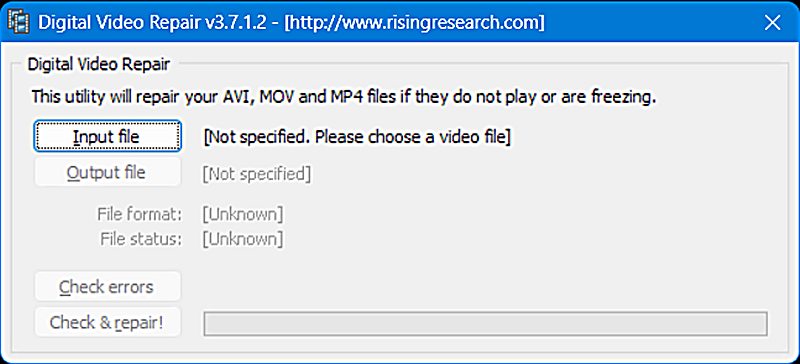
Digital Video Repair by Rising Research serves as a specialized utility designed to address specific structural failures in AVI, MOV, and MP4 files by targeting the container and index layers of the file architecture. The software targets the container and index layers of the file architecture, attempting to restore playability without altering the original audio or video streams. This approach distinguishes it from comprehensive video editors, as it prioritizes speed and data integrity over visual manipulation or re-encoding. For users seeking a mp4 repair free solution, this tool provides a focused mechanism for resolving common playback errors caused by incomplete downloads or improper file termination.
The core functionality of Digital Video Repair revolves around the reconstruction of file indices, which are essential components for media players to interpret the data structure correctly during playback. In AVI files, the index is typically stored in the 'idx1' chunk, while MP4 and MOV files rely on the 'moov atom' to contain timing and offset information necessary for navigation. When these structural elements are missing or corrupted, a video player may fail to load the file or play it back without the ability to seek, pause, or display the correct duration. By analyzing the existing data streams, the software regenerates these essential metadata blocks, effectively mapping the raw audio and video data into a readable timeline that standard media players can understand. This process allows users to utilize a video repair free workflow that mitigates the need for expensive professional recovery services or complex manual hex editing. Ultimately, the utility bridges the gap between a corrupted binary file and a viewable video, ensuring data persistence with minimal user intervention.
Understanding Digital Video Repair architecture
Digital Video Repair functions by reconstructing the file structure index without re-encoding the actual data streams, ensuring rapid processing for AVI, MP4, and MOV containers. The utility operates under the premise that the actual media payload-the video frames and audio samples-remains intact, while the wrapper or navigation data has been damaged or rendered inaccessible. This is a common scenario in interrupted downloads, power failures during recording, or improper file removal from a recording device, where the file allocation table entry is written before the data stream fully completes. By addressing the container rather than the content, the software avoids the resource-intensive task of decompressing and recompressing video data, which often leads to quality degradation.
What are the core mechanics of video repair?
The software analyzes the container structure and regenerates missing or damaged index chunks, such as the idx1 for AVI or moov atom for MP4, which are essential for player navigation. The process involves a linear scan of the file to identify synchronization points and valid frames within the video stream, effectively piecing together the structure based on the available data. Once these sync points are located, the application builds a new index table that tells the player exactly where each frame begins and how long it lasts relative to the start of the file. This mechanical approach is highly effective for physical corruptions where the data exists but is not referenced correctly by the file header, allowing for near-instantaneous recovery compared to full stream restoration.
How does Digital Video Repair differ from re-encoding tools?
Unlike converters that decompress and recompress video, Digital Video Repair modifies only the container metadata, preserving the original quality and avoiding generation loss. Re-encoding is a destructive process that often reduces visual fidelity due to compression artifacts applied during the second pass of encoding, particularly if the original codec settings are not perfectly matched. In contrast, Digital Video Repair acts as a non-invasive surgeon that stitches up the administrative layers of the file, leaving the actual video and audio bits untouched. This distinction is critical for forensic applications or archival footage where maintaining the exact original bitstream is a prerequisite for any recovery operation, ensuring the evidentiary value of the content remains uncompromised.
Why is index reconstruction critical for playback?
A valid index enables media players to seek through the timeline and synchronize audio tracks; without it, playback may fail or lack audio-video sync. Without the index, the media player is essentially flying blind, unable to determine the duration of the video or the offset of specific frames required for seeking functions like fast-forward or rewind. This often results in the player showing an incorrect duration or playing the audio and video out of sync because the interleaving data is missing or scrambled. By restoring the index, Digital Video Repair ensures that the time-based navigation systems standard in all modern media players function correctly with the repaired file, providing a seamless viewing experience.
Key features summary
| Feature | Description | How It Works / Why It Matters |
|---|---|---|
| Index Rebuilding | Regenerates idx1 (AVI) and moov atom (MP4/MOV). | Restores seekability and playback capability by mapping frame data. |
| Batch Processing | Supports adding multiple files to the queue. | Increases efficiency by repairing many files sequentially without user input. |
| Format Support | Handles AVI, MOV, and MP4 containers. | Covers the most common video formats used in digital cameras and downloads. |
| Non-Destructive | Does not re-encode video streams. | Preserves original video quality and avoids generation loss. |
| Freeware License | Free to use for personal and professional tasks. | Removes cost barrier for basic video repair needs. |
How to use Digital Video Repair
Operating Digital Video Repair involves a streamlined selection process where users add files via a standard dialog, initiate the repair with a single click, and monitor the status for completion. The interface is designed to be minimal, removing unnecessary configuration options that could confuse users or lead to incorrect settings regarding codec handling or bitrates. This simplicity is by design, as the repair logic is largely automated and requires no manual intervention regarding complex stream parameters. The user's primary role is simply to identify the corrupted files and provide a destination for the repaired output, allowing the algorithm to handle the technical intricacies of file structure restoration.
What is the step-by-step workflow?
Users launch the application, click 'Add Files' to select corrupted videos, choose the output directory if necessary, and press 'Repair' to start the automatic reconstruction process. The software provides a progress indicator that updates the user on the current status of the repair operation, displaying whether the index is being rebuilt or the file is being truncated. Once the process is complete, a status message indicates whether the repair was successful or if the file was too severely damaged to be fixed by the utility. The repaired files are typically saved with a suffix or in a designated folder to prevent overwriting the original corrupted data, which is a crucial safety feature for data integrity.
How to process multiple files efficiently?
Batch processing allows users to queue multiple corrupted files, repairing them sequentially in one session to save time and effort. This feature is particularly useful for users dealing with large volumes of corrupted files, such as after a mass data recovery operation from a damaged hard drive or a card failure in a professional camera rig. The application processes each file in the list one by one, applying the same reconstruction logic to each item without requiring user supervision between tasks. This automation allows for the restoration of entire libraries of video content with minimal manual interaction, making it a viable tool for both small home projects and larger archival efforts.
How to achieve maximum results with Digital Video Repair
Achieving maximum results with Digital Video Repair requires understanding the types of corruption it can address and preparing files appropriately before processing. Not all video corruption is structural; some issues involve actual data loss within the video stream itself, which this tool is not designed to fix. Identifying the nature of the corruption is the first step in determining whether Digital Video Repair is the appropriate solution for the problem at hand. By filtering out files with stream-based corruption, users can save time and focus the tool on the files it is actually capable of rescuing, thereby optimizing the success rate of the recovery process.
What types of corruption can be fixed?
The tool is most effective against index issues, truncated downloads, and header corruptions, but cannot repair severely damaged data streams or bad sectors on the disk. If the video displays visual artifacts like large blocks of color, skips sections, or the audio is filled with static noise, the corruption is likely within the data payload itself. Digital Video Repair is specialized for structural integrity, meaning it fixes the "container" of the video rather than the "contents" or the visual information inside. Users should verify that their files exhibit symptoms of index corruption, such as incorrect duration or an inability to seek, before initiating a repair attempt to avoid wasting time on unfixable files.
Why is creating a backup essential?
Repair algorithms modify the file structure; creating a backup ensures that the original file remains intact if the repair process fails or produces undesirable results. Since the software writes a new index to the file, there is a possibility that the new index may not align perfectly with the underlying data in rare cases involving complex interleaving patterns. Working on a duplicate safeguards the source data against the unlikely event of a misinterpretation by the repair algorithm, ensuring that the user can revert to the original state if necessary. Best practices dictate that the original corrupted file should be preserved in a read-only state until the repaired file has been fully verified to play correctly from start to finish.
How to handle truncated video files?
For incomplete downloads, the software can cut off the damaged tail sections of the file, allowing the remaining intact portion to be played back without errors. This is particularly useful for files where the download was interrupted near the end, leaving a significant portion of the video valid but inaccessible due to a broken index or missing end markers. By discarding the incomplete data at the end of the file, Digital Video Repair can salvage the watchable portion of the content. Users must accept that the ending of the video may be lost, but the majority of the footage can be recovered effectively, which is often preferable to losing the entire file.
Additional details
The software handles large files by processing the data linearly, which prevents high memory usage even with high-definition video content exceeding several gigabytes. Unlike some players that attempt to load the entire file into memory or construct a complex internal map, Digital Video Repair reads and writes chunks sequentially, making it stable on systems with limited RAM. Additionally, the tool does not install codec packs or modify system registry settings related to video playback, maintaining a clean system footprint. It operates independently of the codecs installed on the system, relying instead on the raw binary structure of the file containers to perform its operations, which avoids conflicts with existing multimedia software.
Alternative perspective: The limitation of container repair
Some experts argue that relying solely on index repair ignores the deeper reality that stream corruption often accompanies index damage in real-world failure scenarios. If a file was truncated, it is highly probable that the last few frames are physically missing from the disk, not just unindexed, meaning no amount of index rebuilding can restore them. While Digital Video Repair can fix the header and index, it cannot conjure data that does not exist on the storage medium. Therefore, users must understand that a "successful" repair might result in a file that plays but is slightly shorter than the original recording, and managing expectations regarding the final output quality and completeness is crucial for user satisfaction.
Comparison with free alternatives
Comparing Digital Video Repair with other free utilities like VLC, DivXRepair, and DivFix++ reveals distinct differences in compatibility, repair depth, and platform support. While all three tools aim to salvage corrupted video files, they operate on different principles and support different file ecosystems. Choosing the right tool depends largely on the specific file format in question and the user's operating environment. A comparative analysis highlights the specific niches each utility fills in the landscape of free video recovery software.
How does Digital Video Repair compare to VLC Media Player?
While VLC offers a built-in 'Always Fix' feature for AVI files, Digital Video Repair supports a wider range of formats like MP4 and MOV with more dedicated reconstruction tools. VLC is primarily a player and its repair features are somewhat rudimentary, often limited to rebuilding the index for AVI files on the fly during playback. Digital Video Repair, being a dedicated utility, offers more granular control over the repair process and handles the more complex MP4 and MOV containers that VLC often struggles to fix permanently. For users who need a permanent file fix rather than a temporary playback workaround, Digital Video Repair provides a more reliable solution.
Digital Video Repair vs DivXRepair
DivXRepair focuses primarily on cutting bad parts of AVI files to make them playable, whereas Digital Video Repair offers broader format support including MP4 and MOV with index rebuilding capabilities. DivXRepair is an older tool that was highly effective during the era of DivX encoded AVIs but lacks the updates necessary for modern MP4 files which are ubiquitous today. Digital Video Repair represents a more modern evolution, supporting the containers that are common in current digital recording devices and streaming formats. Users dealing with modern smartphone footage or MP4 recordings will likely find better success with Digital Video Repair than with the legacy DivXRepair utility.
Digital Video Repair vs DivFix++
DivFix++ is an open-source, cross-platform solution often used for AVI recovery, whereas Digital Video Repair is a Windows-centric tool that provides a more streamlined user experience for casual users. DivFix++ offers a high degree of control and can be run on Linux or Mac via WINE or native builds, making it versatile for technical users on alternative operating systems. However, Digital Video Repair offers a simpler, point-and-click interface that requires less technical knowledge to operate effectively for the average Windows user. For the vast majority of PC users looking for a quick fix without navigating complex technical menus, the usability of Digital Video Repair often outweighs the flexibility provided by the open-source alternatives.
Technical limitations and system requirements
Users must be aware of the software's boundaries regarding file systems, codec compatibility, and the nature of data recovery to set realistic expectations. No tool is universal, and understanding the constraints of Digital Video Repair helps in diagnosing why certain files might remain unplayable even after processing. Being aware of these limitations prevents the frustration of failed repairs and guides users toward the appropriate professional services or alternative software when the corruption is beyond the scope of container-level repair.
Does Digital Video Repair support all video codecs?
The software operates on the container level and generally supports standard codecs found in AVI, MP4, and MOV files, but proprietary or encrypted codecs may hinder successful repair. Since Digital Video Repair does not decode the video stream, it relies on the assumption that the video and audio packets are standard and recognizable by the player. If a file uses a very obscure or proprietary codec that the player cannot decode even with a perfect index, the repair will technically succeed but playback may still fail. Users should ensure their media players have the necessary codec packs installed to handle the actual content of the file, independent of the repair process.
Can Digital Video Repair recover permanently deleted data?
Digital Video Repair is designed to fix existing corrupt files rather than recover data that has been deleted from the file system or overwritten by the operating system. If a file has been deleted and emptied from the recycle bin, Digital Video Repair cannot restore it because it requires a file path to access the data. In such cases, dedicated data recovery software that scans the raw disk sectors is required before any file repair can be attempted. Digital Video Repair is a second-line tool, useful after the file has been recovered from the disk but is found to be corrupted or unplayable.
Frequently Asked Questions
Is Digital Video Repair free?
Yes, Rising Research offers Digital Video Repair as freeware, allowing users to download and use the software without purchasing a license. This free availability makes it an accessible first line of defense against video corruption for individuals and small organizations who may not have the budget for professional recovery services. There are no hidden trial periods or restricted features in the standard version, provided it is used within the terms of service set out by Rising Research. Users should, however, always download the software from the official website to avoid potentially modified versions hosted on third-party sites that could contain malware.
Does Digital Video Repair work on macOS or Linux?
The software is primarily designed for the Windows operating system and does not have native versions for macOS or Linux, though it may run under compatibility layers. Users of alternative operating systems may need to utilize virtualization software like VirtualBox or Wine to run the Windows executable on their Mac or Linux machines. This platform limitation is a significant consideration for users exclusively on non-Windows environments, who might prefer the cross-platform capabilities of DivFix++. For the vast majority of PC users, however, the native Windows integration ensures stable and reliable performance without requiring complex configuration or emulation.
What should I do if repair fails?
If the software cannot fix the file, the corruption likely lies within the video stream data itself rather than the index, requiring more advanced recovery solutions. In such cases, the file may be physically damaged at the sector level on the storage device, or the file structure may be too mangled for the automated algorithm to parse correctly. Users facing this scenario may need to consult professional data recovery services that specialize in low-level bitstream reconstruction or manual hex editing. It is also worth checking if a different media player can play the file, as sometimes the issue lies with the player's decoder rather than the file structure itself, indicating the repair was successful but the playback environment is lacking.